



Coordinating multiple agents#
The previous recipe showed that a node in a LangGraph can be any Python function. It can also be a whole agent. Once a node is an agent, we can wire several specialized agents together and let them coordinate on a task that no single one could finish alone.
Why split the work? In the agents recipe we gave one agent a handful of calculator tools. As the toolbox grows, a single agent starts making worse choices about which tool to use, and its context fills with details relevant to only part of the task. Splitting the work into focused agents keeps each one’s tools and context narrow.
In this recipe we build the same two-agent team two different ways and compare them: the supervisor pattern, where one agent delegates to the others, and the handoffs pattern, where agents transfer control directly.
from dotenv import find_dotenv, load_dotenv

load_dotenv(find_dotenv())
True
The scenario#
We give two specialists a task that needs both of them. A research agent looks up facts about Dartmouth’s libraries from a small fixed knowledge base, and a math agent does arithmetic with the calculator tools from the agents recipe. A request like “look up a number, then double it” forces the two to cooperate.
First, the tools. The calculator tools are the same ones we have used before, and the research tool reads from a small dictionary so its answers stay fixed and reproducible.
from langchain_core.tools import tool


@tool
def add(a: int, b: int) -> int:
    """Add two numbers together."""
    return a + b


@tool
def subtract(a: int, b: int) -> int:
    """Subtract the second number from the first."""
    return a - b


@tool
def multiply(a: int, b: int) -> int:
    """Multiply two numbers."""
    return a * b


# A tiny knowledge base so the research tool returns fixed, checkable facts
LIBRARY_FACTS = {
    "baker": "Baker Memorial Library opened in 1928 with 240000 volumes.",
    "berry": "Berry Library was funded by a 30000000 dollar gift in 1992.",
    "collection": "The Dartmouth College libraries hold over 2000000 volumes today.",
}


@tool
def lookup_library_fact(topic: str) -> str:
    """Look up a fact about Dartmouth's libraries.

    Valid topics are 'baker', 'berry', and 'collection'.
    """
    return LIBRARY_FACTS.get(topic.lower().strip(), "No fact found for that topic.")
We will reuse one chat model for every agent in this recipe.
from langchain_dartmouth.llms import ChatDartmouth

llm = ChatDartmouth(model_name="openai.gpt-oss-120b", temperature=0.0)
Hint
Remember that LLMs are stateless, so as long as we want to use the same model with the same parameters, we can use the same instance of ChatDartmouth for as many agents as we like.
In real applications, it’s often a good idea to use separate instances for each agent. That way you can use more capable models or higher reasoning settings for agents dealing with more difficult tasks, and cheaper or faster models for agents with simpler tasks.
Pattern A: a supervisor with subagents#
In the supervisor pattern, one main agent coordinates the others. Each specialist is wrapped as a tool, so from the supervisor’s point of view, calling the math agent looks like calling any other tool. The supervisor decides which specialist to invoke, passes it a focused request, and combines the results.
In the diagram, every arrow passes through the supervisor. It calls a specialist, the result comes back to it, and only the supervisor speaks to the user.
        flowchart LR
    user([user]) --> supervisor[supervisor]
    supervisor -->|delegate| research[research agent]
    supervisor -->|delegate| math[math agent]
    research -->|result| supervisor
    math -->|result| supervisor
    supervisor --> answer([final answer])
We start by building the two specialists with create_agent(), exactly as in the agents recipe.
from langchain.agents import create_agent

research_agent = create_agent(
    model=llm,
    tools=[lookup_library_fact],
    system_prompt=(
        "You are a research specialist. Use lookup_library_fact to find facts "
        "(valid topics: 'baker', 'berry', 'collection'). Report exactly what the "
        "tool returns; do not invent numbers."
    ),
)

math_agent = create_agent(
    model=llm,
    tools=[add, subtract, multiply],
    system_prompt=(
        "You are a math specialist. Use the calculator tools to compute exact answers."
    ),
)
Now we wrap each specialist in a tool. The tool runs the agent on the query it receives and returns the agent’s final message. The @tool name and description are how the supervisor learns what each specialist is for, so we make them clear.
@tool("research_agent", description="Look up facts about Dartmouth's libraries.")
def call_research_agent(query: str) -> str:
    # Run the research specialist and return its final answer
    result = research_agent.invoke({"messages": [{"role": "user", "content": query}]})
    return result["messages"][-1].content


@tool("math_agent", description="Perform arithmetic and calculations.")
def call_math_agent(query: str) -> str:
    # Run the math specialist and return its final answer
    result = math_agent.invoke({"messages": [{"role": "user", "content": query}]})
    return result["messages"][-1].content
The supervisor is itself an agent. Its tools are the two specialists, and its job is to break the task apart, delegate each piece, and assemble the answer.
supervisor = create_agent(
    model=llm,
    tools=[call_research_agent, call_math_agent],
    system_prompt=(
        "You are a supervisor coordinating two specialists: a research agent that "
        "looks up library facts, and a math agent that performs calculations. "
        "Delegate each part of the task to the right specialist, then combine their "
        "answers into a final response."
    ),
)
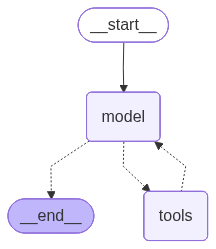
The supervisor is a graph too, so it can draw itself. The diagram shows the agent loop with tools hanging off it. The fact that each tool is actually a specialist agent is not visible here. From the perspective of the supervisor, though, there is no functional difference between calling an agent and calling a tool.
from IPython.display import Image

Image(supervisor.get_graph().draw_mermaid_png())
Note
If draw_mermaid_png() cannot reach its remote renderer, use print(supervisor.get_graph().draw_mermaid()) to print the diagram as text instead.
Let’s give the supervisor a task that needs both specialists: find a number, then double it.
task = "How many volumes did Baker Library open with? Then multiply that number by 2."

result = supervisor.invoke({"messages": [{"role": "user", "content": task}]})

for message in result["messages"]:
    message.pretty_print()
================================ Human Message =================================

How many volumes did Baker Library open with? Then multiply that number by 2.
================================== Ai Message ==================================
Tool Calls:
  research_agent (chatcmpl-tool-91000b078c7e4769)
 Call ID: chatcmpl-tool-91000b078c7e4769
  Args:
    query: Baker Library opened with how many volumes
================================= Tool Message =================================
Name: research_agent

Baker Memorial Library opened in 1928 with **240,000 volumes**.
================================== Ai Message ==================================
Tool Calls:
  math_agent (chatcmpl-tool-b5150e4141018847)
 Call ID: chatcmpl-tool-b5150e4141018847
  Args:
    query: 240000 * 2
================================= Tool Message =================================
Name: math_agent

\(240{,}000 \times 2 = 480{,}000\)
================================== Ai Message ==================================

Baker Memorial Library opened in 1928 with **240,000 volumes**.
Multiplying that number by 2 gives **480,000**.
The trace shows the supervisor calling research_agent for the volume count, then math_agent to double it, then writing the combined answer. Every result flowed back through the supervisor.
Note
That round trip is the cost of the supervisor pattern: each specialist’s answer returns to the supervisor before the next step, which adds a model call. In exchange, the supervisor keeps central control and each specialist works in its own clean context.
Pattern B: handoffs#
In the handoffs pattern there is no central coordinator. One agent transfers control directly to another by calling a special tool, and the receiving agent takes over the conversation with the user. Whichever agent last took over stays active across turns until it hands off again, so a handoff is less a one-shot delegation than a change of who is talking to the user.
We will run a four-turn conversation that bounces between the two agents. The research agent answers a library question, hands off to math for a calculation, math answers a follow-up calculation on its own, then hands back to research for another library question. Two agents take turns with the user, and control crosses between them in both directions.
        flowchart LR
    user([user]) <--> research[research agent]
    user([user]) <--> math[math agent]
    research <-->|transfer| math
Each arrow runs both ways. Whichever agent is active talks to the user, and either agent can hand the conversation to the other.
The transfer happens through a tool that returns a Command. The Command names the node to jump to (goto) and updates the shared state, including which agent is now active. The fiddly part is the message history: when a model calls a tool, it expects a matching response, so the handoff tool has to pass back both the AIMessage that triggered the transfer and a ToolMessage that answers it. Without that pair, the receiving agent sees a broken conversation.
from typing_extensions import NotRequired
from langchain.agents import AgentState
from langchain.messages import AIMessage, ToolMessage
from langchain.tools import ToolRuntime
from langgraph.types import Command


# Shared state tracks which agent is currently active
class MultiAgentState(AgentState):
    active_agent: NotRequired[str]


def last_ai_message(messages):
    # The most recent AIMessage is the one whose tool call we must answer
    return next(msg for msg in reversed(messages) if isinstance(msg, AIMessage))


@tool
def transfer_to_math(runtime: ToolRuntime) -> Command:
    """Hand the conversation to the math agent for any calculation."""
    # Pass the triggering AIMessage and a matching ToolMessage so history stays valid
    transfer_message = ToolMessage(
        content="Transferred to math agent.",
        tool_call_id=runtime.tool_call_id,
    )
    return Command(
        goto="math_agent",  # jump to the math agent node
        update={
            "active_agent": "math_agent",  # remember who is now active
            "messages": [last_ai_message(runtime.state["messages"]), transfer_message],
        },
        graph=Command.PARENT,  # navigate in the parent graph
    )


@tool
def transfer_to_research(runtime: ToolRuntime) -> Command:
    """Hand the conversation to the research agent for any library fact."""
    # Mirror image of transfer_to_math, going the other direction
    transfer_message = ToolMessage(
        content="Transferred to research agent.",
        tool_call_id=runtime.tool_call_id,
    )
    return Command(
        goto="research_agent",
        update={
            "active_agent": "research_agent",
            "messages": [last_ai_message(runtime.state["messages"]), transfer_message],
        },
        graph=Command.PARENT,
    )
Warning
Handoffs need careful handling of the message history. The AIMessage that called a handoff tool must be paired with a ToolMessage that answers it, or the conversation becomes malformed and the receiving agent misbehaves. Both transfer tools follow this pairing, and so must any handoff tool you add.
Now we build the two agents, and this time each one can hand off to the other. The research agent answers library questions but cannot do arithmetic, so any calculation forces a transfer_to_math. The math agent does arithmetic but knows nothing about the libraries, so any library question forces a transfer_to_research. The strict “you cannot do this, do not guess” framing matters: without it the model is tempted to answer from its own knowledge instead of handing off.
research_front_desk = create_agent(
    model=llm,
    tools=[lookup_library_fact, transfer_to_math],
    system_prompt=(
        "You are the front-desk research agent. You answer questions about "
        "Dartmouth's libraries using lookup_library_fact (valid topics: 'baker', "
        "'berry', 'collection'). You CANNOT do arithmetic of any kind. If the "
        "request requires any calculation, you MUST call transfer_to_math to hand "
        "the conversation to the math agent. Never attempt math yourself."
    ),
)

math_specialist = create_agent(
    model=llm,
    tools=[add, subtract, multiply, transfer_to_research],
    system_prompt=(
        "You are the math agent. Use the calculator tools to perform the requested "
        "calculation and give the final answer. You have NO knowledge of Dartmouth's "
        "libraries and CANNOT look facts up. If the request asks for any library "
        "fact, you MUST call transfer_to_research to hand the conversation back to "
        "the research agent. Never guess or answer a library question yourself."
    ),
)
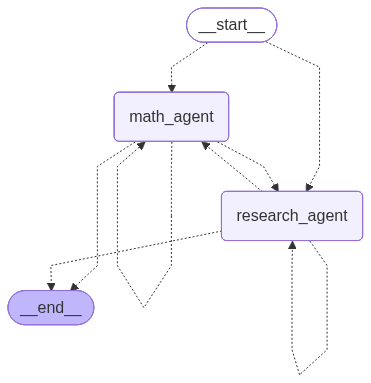
Now we place both agents as nodes in a graph. Two routers run the show. The first, route_initial, reads active_agent to decide where each turn re-enters: the conversation resumes with whichever agent was last active, defaulting to research on the very first turn. The second, route_after_agent, runs after an agent finishes and decides whether the work is done (the last message is a plain answer) or control should pass to whoever is now active. Because both routers can reach either agent, control flows in both directions.
from typing import Literal
from langgraph.graph import StateGraph, START, END


def call_research(state: MultiAgentState):
    return research_front_desk.invoke(state)


def call_math(state: MultiAgentState):
    return math_specialist.invoke(state)


def route_initial(state: MultiAgentState) -> Literal["research_agent", "math_agent"]:
    # Resume with whichever agent was last active; start at research by default
    return state.get("active_agent", "research_agent")


def route_after_agent(
    state: MultiAgentState,
) -> Literal["research_agent", "math_agent", "__end__"]:
    messages = state.get("messages", [])
    last = messages[-1] if messages else None
    # A plain answer with no tool call means this turn is finished
    if isinstance(last, AIMessage) and not last.tool_calls:
        return "__end__"
    # Otherwise continue with whichever agent is now active
    return state.get("active_agent", "research_agent")


builder = StateGraph(MultiAgentState)
builder.add_node("research_agent", call_research)
builder.add_node("math_agent", call_math)

# Conditional entry point: resume with the active agent
builder.add_conditional_edges(START, route_initial, ["research_agent", "math_agent"])
# Both agents can hand off to either agent or finish the turn
builder.add_conditional_edges(
    "research_agent", route_after_agent, ["research_agent", "math_agent", END]
)
builder.add_conditional_edges(
    "math_agent", route_after_agent, ["research_agent", "math_agent", END]
)

handoff_graph = builder.compile()
The diagram shows the two-way structure: a conditional entry point that can start at either agent, and edges letting each agent hand off to the other or end the turn.
Image(handoff_graph.get_graph().draw_mermaid_png())
Now we run the conversation. We pass state by hand: each turn appends the new user message to the messages from the last turn, invokes the graph, and keeps the returned state for the next turn. That returned state carries both the full message history and the active_agent field, so the conversation remembers what was said and who is talking.
Note
Threading state by hand keeps the mechanism visible, but production systems usually delegate it to a checkpointer, which persists state under a thread_id so you only pass the new message. We keep checkpointers and persistence out of scope here; see a future recipe for that.
# Start with an empty conversation and no active agent
state = {"messages": []}


def run_turn(user_message: str):
    """Append a user message, run the graph, and print only this turn's messages."""
    global state
    prev_len = len(state["messages"])  # remember where the new turn begins
    state["messages"] = state["messages"] + [{"role": "user", "content": user_message}]
    state = handoff_graph.invoke(state)
    # The graph returns the whole history, so slice to just this turn
    for message in state["messages"][prev_len:]:
        message.pretty_print()
    print(f"\nactive_agent: {state.get('active_agent')}")
Turn 1. A plain library question. The research agent looks it up and answers, with no handoff.
run_turn("How many volumes did Baker Library open with?")
================================ Human Message =================================

How many volumes did Baker Library open with?
================================== Ai Message ==================================
Tool Calls:
  lookup_library_fact (chatcmpl-tool-84215bf97c07ce33)
 Call ID: chatcmpl-tool-84215bf97c07ce33
  Args:
    topic: baker
================================= Tool Message =================================
Name: lookup_library_fact

Baker Memorial Library opened in 1928 with 240000 volumes.
================================== Ai Message ==================================

Baker Memorial Library opened in 1928 with 240,000 volumes.

active_agent: None
Turn 2. Now a calculation on that number. The research agent cannot multiply, so it calls transfer_to_math, and the math agent takes over. The number 240000 comes from turn 1’s history, which is why carrying state forward matters.
run_turn("Multiply that by 2.")
================================ Human Message =================================

Multiply that by 2.
================================== Ai Message ==================================
Tool Calls:
  transfer_to_math (chatcmpl-tool-87a63f1b5bf4877a)
 Call ID: chatcmpl-tool-87a63f1b5bf4877a
  Args:
================================= Tool Message =================================
Name: transfer_to_math

Transferred to math agent.
================================== Ai Message ==================================
Tool Calls:
  multiply (chatcmpl-tool-abee237b7c9733c5)
 Call ID: chatcmpl-tool-abee237b7c9733c5
  Args:
    a: 240000
    b: 2
================================= Tool Message =================================
Name: multiply

480000
================================== Ai Message ==================================

\(240{,}000 \times 2 = 480{,}000\).

active_agent: math_agent
Turn 3. Another calculation. The math agent is already active, so the entry router sends this turn straight to it. No handoff happens; one agent stays with the user across turns.
run_turn("What is that plus 1000?")
================================ Human Message =================================

What is that plus 1000?
================================== Ai Message ==================================
Tool Calls:
  add (chatcmpl-tool-b25a376d4329656b)
 Call ID: chatcmpl-tool-b25a376d4329656b
  Args:
    a: 480000
    b: 1000
================================= Tool Message =================================
Name: add

481000
================================== Ai Message ==================================

\(480{,}000 + 1{,}000 = 481{,}000\).

active_agent: math_agent
Turn 4. Back to a library question while the math agent is active. The math agent has no library knowledge, so it calls transfer_to_research, and control returns to the research agent, which looks up the fact.
run_turn("Which library received a 30 million dollar gift, and in what year?")
================================ Human Message =================================

Which library received a 30 million dollar gift, and in what year?
================================== Ai Message ==================================
Tool Calls:
  transfer_to_research (chatcmpl-tool-8448c9a9663e6ef4)
 Call ID: chatcmpl-tool-8448c9a9663e6ef4
  Args:
================================= Tool Message =================================
Name: transfer_to_research

Transferred to research agent.
================================== Ai Message ==================================
Tool Calls:
  lookup_library_fact (chatcmpl-tool-9ef29052b01431a8)
 Call ID: chatcmpl-tool-9ef29052b01431a8
  Args:
    topic: berry
================================= Tool Message =================================
Name: lookup_library_fact

Berry Library was funded by a 30000000 dollar gift in 1992.
================================== Ai Message ==================================

The Berry Library received a **$30 million** gift, and it was made in **1992**.

active_agent: research_agent
Over four turns, control crossed between the agents twice in both directions, and active_agent tracked who was talking at each step. No coordinator sat in the middle: the agents passed the conversation between themselves, and the carried-forward state let each one pick up where the last left off.
Comparing the patterns#
Both patterns coordinated the same two agents, but they route work differently. The four-turn conversation showed the handoffs side of the table directly: whichever agent was active spoke to the user, and control hopped between them across turns instead of returning to one coordinator.
Supervisor / subagents |
Handoffs |
|
|---|---|---|
Control flow |
Centralized: everything returns to the supervisor |
Distributed: agents pass control to each other |
Parallel work |
Supervisor can call subagents at once |
Sequential, one agent at a time |
Direct user interaction |
Only the supervisor talks to the user |
Whichever agent is active talks to the user |
Relative cost |
An extra model call per delegation |
No coordinator overhead |
Hint
Use a supervisor when you want one place in charge and the ability to fan work out to several specialists at once. Use handoffs when agents take turns talking to the user across stages of a conversation, like a front desk passing you to a specialist. These two are not the only options: the docs also describe router, skills, and Deep Agents patterns you may want to explore next.
Summary#
In this recipe, we have learned two ways to coordinate multiple agents:
Splitting work across specialized agents keeps each one’s tools and context focused, which beats one agent with too many tools.
In the supervisor pattern, a main agent calls specialists wrapped as tools and combines their results; all control stays central.
In the handoffs pattern, an agent transfers control directly with a
Command, and the receiving agent continues the conversation; the active agent stays with the user across turns, and theAIMessageandToolMessagemust stay paired to keep the history valid.Choose a supervisor for centralized control and parallel delegation, and handoffs for staged conversations where agents take turns with the user.